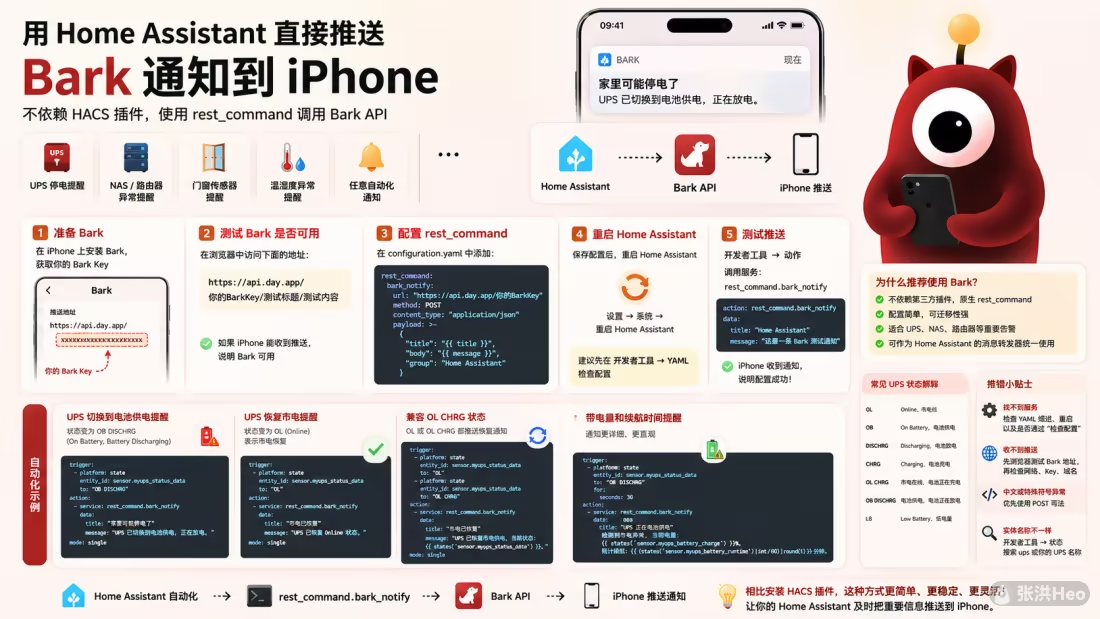
这篇文章介绍了如何不依赖 HACS 插件 ,直接在 Home Assistant 中用内置 rest_command 对接 Bark ,实现 iPhone 推送通知 。文章从 Bark 安装与测试开始,说明了 GET 与更推荐的 POST 两种配置方式,并给出在开发者工具中测试服务的方法。随后重点结合 NUT UPS 场景,提供停电提醒、来电恢复、兼容 OL CHRG 状态、电量与续航信息展示,以及通过 for 条件避免闪断误报的自动化示例。最后还总结了常见报错排查思路和 UPS 状态含义,适合作为 HA 统一告警方案 。
发送
最近因为刚弄好UPS接入软路由,想要在停电的时候给自己手机发个通知,这样就能远程知道家里的动向了。发现了ha-bark 这个集成,但是有一些bug还不好操作。研究了一下发现一个不错的方法,修改配置文件来实现。
本文介绍如何不依赖 HACS 插件,直接使用 Home Assistant 内置的 rest_command 调用 Bark API,实现消息推送到 iPhone。
适合场景:
UPS 停电提醒
NAS / 路由器 / 服务器异常提醒
门窗传感器提醒
温湿度异常提醒
任意 Home Assistant 自动化通知
一、准备 Bark 1. 安装 Bark App 在 iPhone 上安装 Bark。
安装后打开 Bark,首页会显示一个推送地址,通常类似:
1 https://api.day.app/xxxxxxxxxxxxxxxxxxxx
其中后面的这一段就是你的 Bark Key:
后文会用到。
二、测试 Bark 是否可用 在浏览器中打开下面格式的地址:
1 https://api.day.app/你的BarkKey/测试标题/测试内容
例如:
1 https://api.day.app/xxxxxxxxxxxxxxxxxxxx/HomeAssistant测试/这是一条来自HA的测试消息
如果 iPhone 能收到推送,说明 Bark 可用。
如果你使用自建 Bark Server,则地址格式类似:
1 https://你的Bark服务器域名/你的BarkKey/测试标题/测试内容
三、在 Home Assistant 中配置 rest_command 打开 Home Assistant 的 configuration.yaml,添加以下内容:
1
2
3
4
rest_command: bark_notify: url: "https://api.day.app/你的BarkKey/{{ title }} /{{ message }} " method: GET
如果你是自建 Bark Server,则改成:
1
2
3
4
rest_command: bark_notify: url: "https://你的Bark服务器域名/你的BarkKey/{{ title }} /{{ message }} " method: GET
例如:
1
2
3
4
rest_command: bark_notify: url: "https://api.day.app/xxxxxxxxxxxxxxxxxxxx/{{ title }} /{{ message }} " method: GET
四、重启 Home Assistant 保存 configuration.yaml 后,需要重启 Home Assistant。
路径一般是:
1 设置 → 系统 → 重启 Home Assistant
如果你使用的是 YAML 配置比较多的环境,也建议先检查配置:
确认无误后再重启。
五、在开发者工具中测试 Bark 推送 重启完成后,进入:
搜索服务:
1 rest_command.bark_notify
进入yaml模式,填入测试数据:
1
2
3
4
action: rest_command.bark_notify data: title: "Home Assistant" message: "这是一条 Bark 测试通知"
点击调用服务。
如果 iPhone 收到通知,说明 Home Assistant 已经可以通过 Bark 推送消息了。
六、UPS 停电提醒自动化示例 如果你已经接入 NUT UPS,并且有类似下面的 UPS 状态传感器:
1 sensor.myups_status_data
当 UPS 状态变为:
表示:
1 On Battery, Battery Discharging
也就是 UPS 正在电池供电、电池正在放电。
可以创建如下自动化:
1
2
3
4
5
6
7
8
9
10
11
12
alias: UPS 切换到电池时 Bark 推送 description: UPS 检测到市电异常并切换到电池供电时,通过 Bark 推送提醒。 trigger: - platform: state entity_id: sensor.myups_status_data to: "OB DISCHRG" action: - service: rest_command.bark_notify data: title: "家里可能停电了" message: "UPS 已切换到电池供电,正在放电。" mode: single
七、UPS 恢复市电提醒自动化示例 当 UPS 状态变为:
表示:
也就是市电恢复,UPS 回到在线供电状态。
可以创建恢复提醒:
1
2
3
4
5
6
7
8
9
10
11
12
alias: UPS 恢复市电时 Bark 推送 description: UPS 从电池供电恢复到市电在线时,通过 Bark 推送提醒。 trigger: - platform: state entity_id: sensor.myups_status_data to: "OL" action: - service: rest_command.bark_notify data: title: "市电已恢复" message: "UPS 已恢复 Online 状态。" mode: single
八、兼容 OL CHRG 状态 有些 UPS 在恢复市电后,不会马上变成 OL,而是会先变成:
意思是:
1 Online, Battery Charging
也就是市电恢复,同时电池正在充电。
如果你想在 OL 或 OL CHRG 时都推送“市电恢复”,可以这样写:
1
2
3
4
5
6
7
8
9
10
11
12
13
14
alias: UPS 恢复市电时 Bark 推送 trigger: - platform: state entity_id: sensor.myups_status_data to: "OL" - platform: state entity_id: sensor.myups_status_data to: "OL CHRG" action: - service: rest_command.bark_notify data: title: "市电已恢复" message: "UPS 已恢复市电供电,当前状态:{{ states('sensor.myups_status_data') }} " mode: single
九、带电量和续航时间的 UPS 提醒 如果你的 Home Assistant 中有这些实体:
1
2
3
sensor.myups_battery_charge sensor.myups_battery_runtime sensor.myups_status_data
可以让通知更详细:
1
2
3
4
5
6
7
8
9
10
11
12
13
alias: UPS 电池供电详细提醒 trigger: - platform: state entity_id: sensor.myups_status_data to: "OB DISCHRG" action: - service: rest_command.bark_notify data: title: "UPS 正在电池供电" message: >- 检测到市电异常。当前电量:{{ states('sensor.myups_battery_charge') }}%, 预计续航:{{ states('sensor.myups_battery_runtime') }} 秒。 mode: single
如果 battery_runtime 单位是秒,想转换成分钟,可以这样写:
1
2
3
4
5
6
7
8
9
10
11
12
13
alias: UPS 电池供电详细提醒 trigger: - platform: state entity_id: sensor.myups_status_data to: "OB DISCHRG" action: - service: rest_command.bark_notify data: title: "UPS 正在电池供电" message: >- 检测到市电异常。当前电量:{{ states('sensor.myups_battery_charge') }}%, 预计续航:{{ (states('sensor.myups_battery_runtime') | int / 60) | round(1) }} 分钟。 mode: single
十、避免短暂波动频繁推送 如果市电只是闪断,UPS 可能只切换电池几秒或几十秒。
如果你不想因为瞬时波动就推送,可以加 for 条件,例如 UPS 持续电池供电 30 秒后再通知:
1
2
3
4
5
6
7
8
9
10
11
12
13
alias: UPS 电池供电超过30秒提醒 trigger: - platform: state entity_id: sensor.myups_status_data to: "OB DISCHRG" for: seconds: 30 action: - service: rest_command.bark_notify data: title: "家里可能停电了" message: "UPS 已经持续电池供电超过 30 秒。" mode: single
如果想更稳,可以设置为 1 分钟:
十一、URL 编码问题 Bark 的简单 URL 格式对中文通常可以正常处理,但如果你遇到推送失败、内容丢失、特殊符号异常,可以改用 POST 方式。
GET 简单写法 1 2 3 4 rest_command: bark_notify: url: "https://api.day.app/你的BarkKey/{{ title }} /{{ message }} " method: GET
POST 推荐写法 1 2 3 4 5 6 7 8 9 10 rest_command: bark_notify: url: "https://api.day.app/你的BarkKey" method: POST content_type: "application/json" payload: >- { "title": "{{ title }}", "body": "{{ message }}" }
对应调用方式不变:
1 2 3 4 service: rest_command.bark_notify data: title: "Home Assistant" message: "这是一条 Bark 测试通知"
如果你的通知内容里经常包含中文、空格、冒号、百分号、换行,建议使用 POST 写法。
十二、带铃声、分组、图标的 Bark 推送 Bark 支持一些额外参数,例如:
sound:通知铃声group:通知分组icon:通知图标url:点击通知后打开的链接
可以这样配置:
1 2 3 4 5 6 7 8 9 10 11 12 rest_command: bark_notify: url: "https://api.day.app/你的BarkKey" method: POST content_type: "application/json" payload: >- { "title": "{{ title }}", "body": "{{ message }}", "group": "Home Assistant", "sound": "alarm" }
调用:
1 2 3 4 service: rest_command.bark_notify data: title: "UPS 警报" message: "UPS 已切换到电池供电。"
十三、推荐最终配置 更推荐使用 POST 方式,兼容性更好。
最终建议配置如下:
1 2 3 4 5 6 7 8 9 10 11 rest_command: bark_notify: url: "https://api.day.app/你的BarkKey" method: POST content_type: "application/json" payload: >- { "title": "{{ title }}", "body": "{{ message }}", "group": "Home Assistant" }
UPS 停电提醒:
1 2 3 4 5 6 7 8 9 10 11 12 13 14 15 alias: UPS 电池供电超过30秒提醒 trigger: - platform: state entity_id: sensor.myups_status_data to: "OB DISCHRG" for: seconds: 30 action: - service: rest_command.bark_notify data: title: "家里可能停电了" message: >- UPS 已经切换到电池供电超过 30 秒。 当前状态:{{ states('sensor.myups_status_data') }}。 mode: single
UPS 恢复提醒:
1 2 3 4 5 6 7 8 9 10 11 12 13 14 alias: UPS 恢复市电提醒 trigger: - platform: state entity_id: sensor.myups_status_data to: "OL" - platform: state entity_id: sensor.myups_status_data to: "OL CHRG" action: - service: rest_command.bark_notify data: title: "市电已恢复" message: "UPS 已恢复市电供电,当前状态:{{ states('sensor.myups_status_data') }} 。" mode: single
十四、排错方法 1. 服务里找不到 rest_command.bark_notify 检查:
configuration.yaml 缩进是否正确是否已经重启 Home Assistant
是否通过“检查配置”
2. 调用服务没有收到推送 先在浏览器里测试 Bark 地址是否能正常推送:
1 https://api.day.app/你的BarkKey/测试标题/测试内容
如果浏览器测试也收不到,问题在 Bark 或 iPhone 通知权限。
如果浏览器能收到,但 Home Assistant 收不到,检查:
Home Assistant 是否能联网
Bark Key 是否正确
自建 Bark Server 域名是否可访问
YAML 配置是否生效
3. 中文或特殊符号推送异常 优先使用 POST 写法:
1 2 3 4 5 6 7 8 9 10 rest_command: bark_notify: url: "https://api.day.app/你的BarkKey" method: POST content_type: "application/json" payload: >- { "title": "{{ title }}", "body": "{{ message }}" }
4. UPS 状态实体名称不一样 进入 Home Assistant:
搜索:
或者搜索你的 UPS 名称,例如:
找到真正的状态实体后,把自动化里的:
1 entity_id: sensor.myups_status_data
替换成你自己的实体 ID。
十五、常见 UPS 状态解释
状态
含义
OLOnline,市电在线
OBOn Battery,电池供电
DISCHRGDischarging,电池放电
CHRGCharging,电池充电
OL CHRG市电在线,电池正在充电
OB DISCHRG电池供电,电池正在放电
LBLow Battery,低电量
十六、总结 最推荐的结构是:
1
2
3
4
5
6
7
Home Assistant 自动化 ↓ rest_command.bark_notify ↓ Bark API ↓ iPhone 推送通知
相比安装 HACS 插件,这种方式优点是:
不依赖第三方集成
配置简单
可迁移性强
适合 UPS、NAS、路由器等重要告警
可以统一作为 Home Assistant 的消息转发器使用